Operators
Types of Operators
Operators are used to filter, loop, store or synchronize data generated by a Trigger or an Action.
The list of Operators can be displayed by clicking on Operators in the library:

Condition
The Condition Operator is used to evaluate one or several expressions to check if they are true or false. It is similar to the If/Else If/Else conditions
that you can find in programming. A Condition therefore allows conditional execution of your playbook based on the evaluation of these expressions.
To add a condition, it is needed to add a case, by clicking on the + button then Add form:

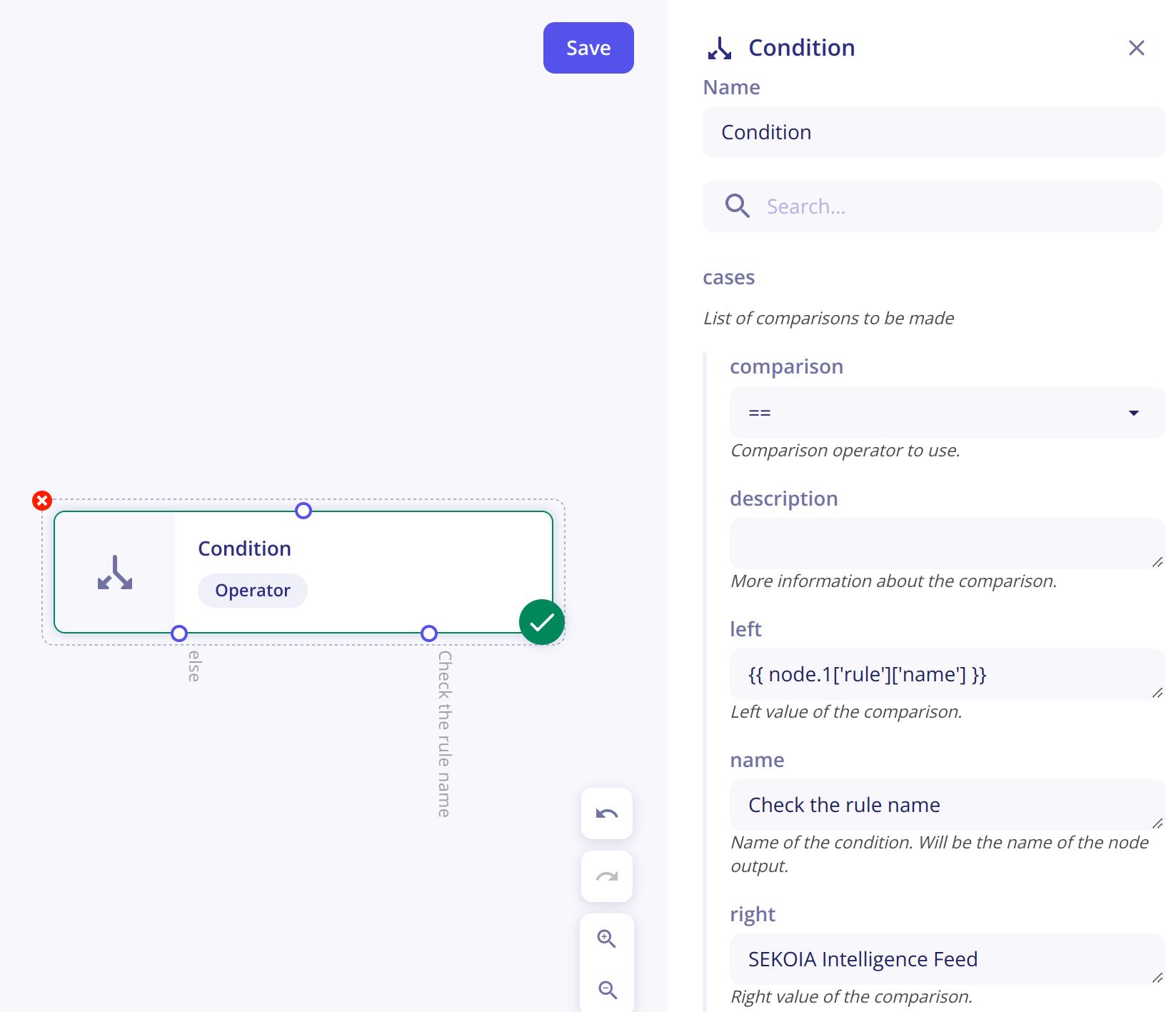
When you create a case, you need to configure it by filling the fields:
Comparaison- The comparison element of your expressionLeft- the left part of your expression before the comparison elementRight- the right part of your expression after the comparison elementName- Name of your case
Example
In this exemple, a condition is created to check if the rule name that triggered the playbook - {{ node.1['rule']['name'] }} - is the SEKOIA Intelligence Feed rule.
Comparison types
This array shows the different types of comparison available with examples:
| Comparison | Meaning | Exemple left | Exemple right | Additional information |
|---|---|---|---|---|
| == | Equal to | {{ node.1['rule']['name'] }} | SEKOIA Intelligence Feed | |
| != | Not equal to | {{ node.1['rule']['name'] }} | SEKOIA Intelligence Feed | |
| < | Less than | {{ node.1['urgency']['current_value'] }} | {{ 80 }} | For number comparison, it is needed to transform the value as an "Integer" because it is interpreted as a String by default. For that the value is surrounded by curly brackets. |
| > | Greater than | {{ node.1['urgency']['current_value'] }} | {{ 80 }} | For number comparison, it is needed to transform the value as an "Integer" because it is interpreted as a String by default. For that the value is surrounded by curly brackets. |
| <= | Less than or equal to | {{ node.1['urgency']['current_value'] }} | {{ 80 }} | For number comparison, it is needed to transform the value as an "Integer" because it is interpreted as a String by default. For that the value is surrounded by curly brackets. |
| >= | Greater than or equal to | {{ node.1['urgency']['current_value'] }} | {{ 80 }} | For number comparison, it is needed to transform the value as an "Integer" because it is interpreted as a String by default. For that the value is surrounded by curly brackets. |
| in | Includes in | {{ node.1['rule']['name'] }} | ["my rule 1", "my second rule", "my third rule"] | |
| not in | Not includes in | {{ node.1['rule']['name'] }} | ["my rule 1", "my second rule", "my third rule"] | |
| range | In the range of | {{ node.1['urgency']['current_value'] }} | [{{10}}, {{100}}] | Edge values are included in the range |
Foreach
The Operator Foreach is specialised in the browsing of a list of data.
To configure the Foreach, you need to fill the field Items corresponding of the list of data.
This Operator has two output branches:
- One called
loopwhich will be executed for every item in the list. - One that will be executed after the loop on the different items is finished.
The Foreach module has 3 outputs:
node.X.default.value- The reference of the current item in the loopnode.X.default.index- The number of iterations performed (starts at 0)node.X.default.total- The total number of items
For instance, if the Foreach is the node 3 and you want to get the reference of the current item in the loop, you can use {{node.3.default.value}}
Any
The Any operator is used to join diverging branches of a playbook. When an action splits execution into multiple parallel branches, Any resumes execution as soon as at least one of those branches completes — without waiting for the others to finish.
Example
If an action starts two parallel enrichment tasks, the playbook continues past Any as soon as the first enrichment result is available, regardless of whether the second has finished.
All
The All operator is also used to join diverging branches of a playbook. Unlike Any, All waits for every parallel branch to complete before resuming execution.
Example
If an action starts two parallel enrichment tasks, the playbook only continues past All once both enrichment results are available.
Store
The Operator Store allows a user to store data in a step of a playbook and retrieve it in another module.
A data is always associated to a key. To store an information, you have to create a modification by clicking on + then Add form.
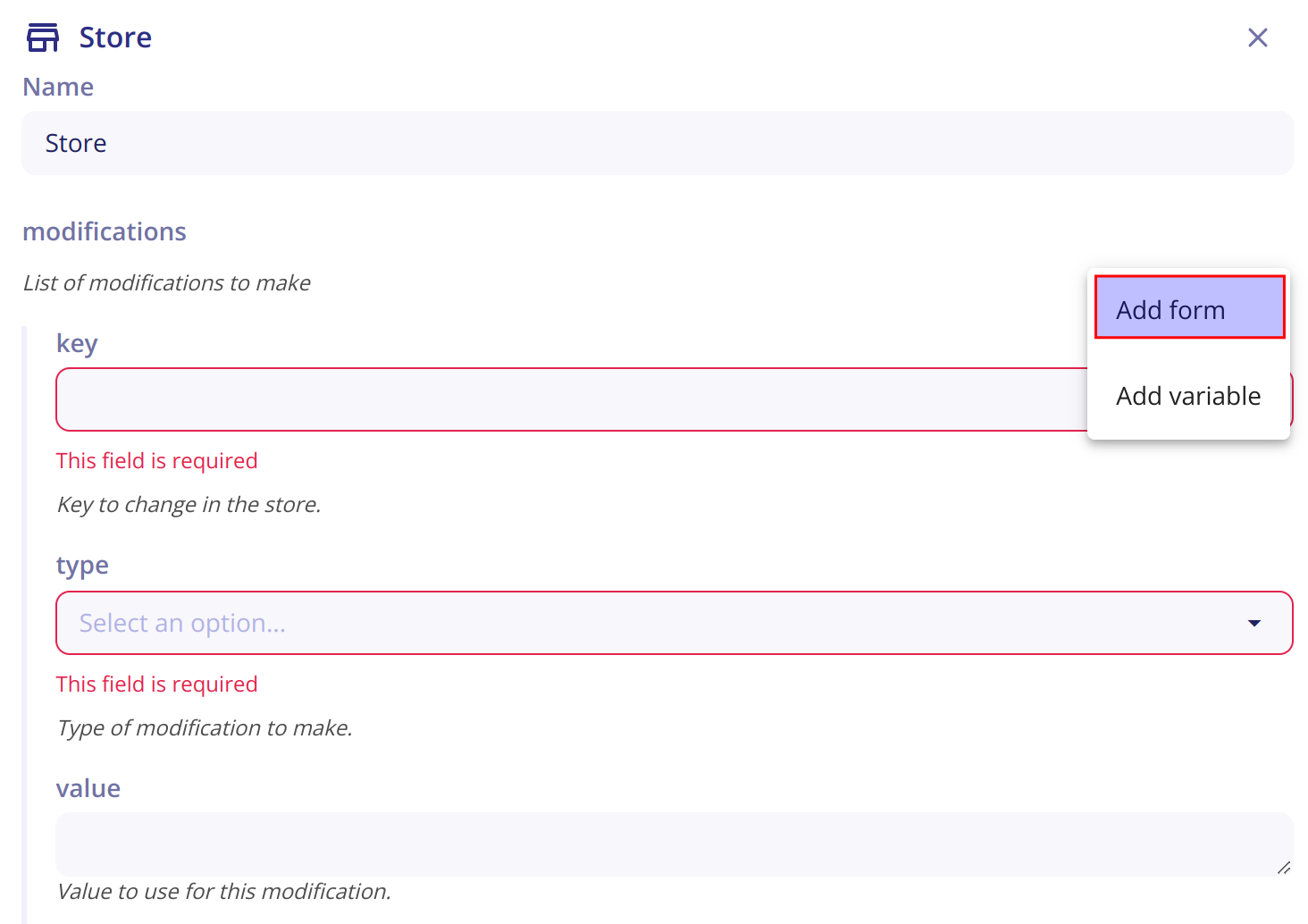
To configure your modification, you need to fill 3 fields :
key- The key will be used to retrieve the data in another module or to edit it in another store.type- The type correponds to the action you want to do.value- The value of the data.
Retrieve data from the store
To retrieve information from the store in a module, you need to specify the key associated to it.
Example
To retrieve the list of IPs stored in the key ip: use {{ store.ip }}.
Types of store
4 types are available within a Store:
set: to set a value for the specified key.unset: to unset the value of the specified key.append: to store the value in a list referenced by the key. If the list does not exist, it is created, otherwise the value is appended to it.remove: to remove a value from a list referenced by the key.
Access a key from a store in another module
To access a key from a store in another module: use {{ store.name_of_the_key }}.