SOL detection rules
SOL detection rules let you write detection logic directly in Sekoia Operating Language (SOL), turning your investigations into active detections without any conversion step. This article explains what SOL detection rules are, how they work, and when to use them.
Early Access
This feature is currently in Early Access and is only available for Beta testers. Sekoia.io plans to roll out this functionality to all environments soon.
What are SOL detection rules
SOL detection rules are detection rules that execute a SOL query on a defined schedule and generate alerts when the query returns results. Unlike Sigma-based rules, they let you reuse your existing SOL investigation queries as-is, closing the gap between investigation and detection in a single workflow.
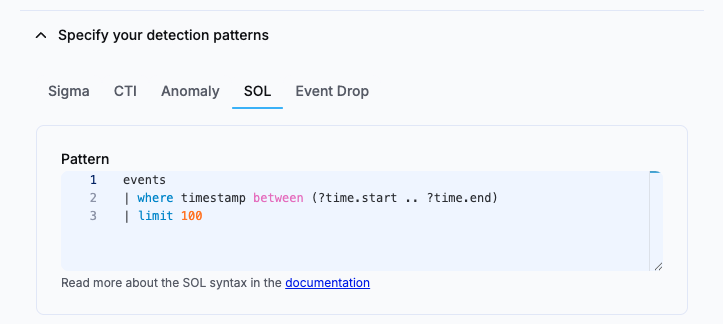
A detection rule uses a single detection pattern. When you create a rule, you choose one pattern type in the Specify your detection patterns area, where SOL and Event Drop sit alongside Sigma, CTI and Anomaly. SOL and Event Drop are the two SOL-powered patterns.
SOL-powered detection patterns
Two detection patterns run on SOL:
| Detection pattern | Purpose |
|---|---|
| SOL | Executes a SOL query on a schedule and raises a security alert when results are returned |
| Event Drop | Monitors events, intakes or assets for missing or dropped events and alerts you when expected data stops flowing (relies on SOL query) |
How SOL detection rules work
When you create a SOL detection rule, the platform executes your query at the frequency you define. Each execution is logged. Each run injects its time window into the query through the ?time.start and ?time.end placeholders, which your SOL pattern must include. See Create a SOL detection rule for the query requirements.
By default, all of a rule's matches are grouped into a single alert, and each new match increments that alert's occurrence counter. You can configure a similarity strategy to split matches into separate alerts by field value instead. For details, see Alert similarity for SOL detection rules.
Result cap
SOL detection rules automatically cap query results at 10,000 rows per execution. Queries that would return more rows are truncated at that limit. This is a temporary protective limit and may be raised in the future.
Rules start executing immediately after creation. Results are accessible directly from the alert view.
To handle events that reach the platform after their timestamp, each run overlaps the previous run's window by a fixed 5 minutes, and overlapping results are deduplicated so the same alert is not raised twice. For details, see Lag management for SOL detection rules.
Alerts generated by SOL detection rules
Alerts generated by SOL and Event Drop rules include a dedicated Results tab that displays the raw, paginated results returned by the query for that execution.
Event Drop alerts
Alerts generated by Event Drop rules do not include threat intelligence enrichment or a Kill Chain phase, as these do not apply to availability monitoring.
When to use SOL detection rules
- You have already written a SOL query during an investigation and want to operationalize it as a standing detection without rewriting it in Sigma.
- You want to detect patterns or conditions that are difficult to express in standard Sigma syntax.
- You need to monitor events, intakes or assets for data availability issues using an Event Drop pattern.
Related articles
- Create a SOL detection rule: Step-by-step instructions to configure and activate a SOL or Event Drop detection rule.
- Create an Event Drop rule from an intake or asset: Create a pre-filled Event Drop rule directly from an intake or asset details page.
- Alert similarity for SOL detection rules: How SOL rules group matches into alerts, the group-all default, and how to configure a similarity strategy.
- Lag management for SOL detection rules: How rules handle late-arriving events through a fixed run overlap and deduplication.
- Write queries in SOL: Reference guide for SOL syntax, operators, and functions.