Facing issues with logs collection
Please find some general information that will help you to troubleshoot your logs collection
General verification steps
Configuration verification
- Check that all pre-requisites are met
- Configuration setup need to be done with admin permissions
- Depending on the integration and ingestion method, a restart has to be done and delay might happen
Collect issue
Please consult our documentation for each technology used
Using a playbook connector
- Check the playbook logs
- Check your account configuration (credentials, url...)
- Check if the logs are generated on your technological platform
Using a log concentrator
- Check the logs and send it to a local file for testing
- Redo the installation following our documentation
Note
When possible, we recommend using Sekoia.io Forwarder as it is simple and quick to use
Parsing verification when in error
- Check the field
sekoia.intake.parsing_errorin the events page - Compare events sent with the
Event Samplesof the intake documentation (expected log format) -
For most intakes, it is possible to test through
intakes page > + new intake > <intake name>and click onSee format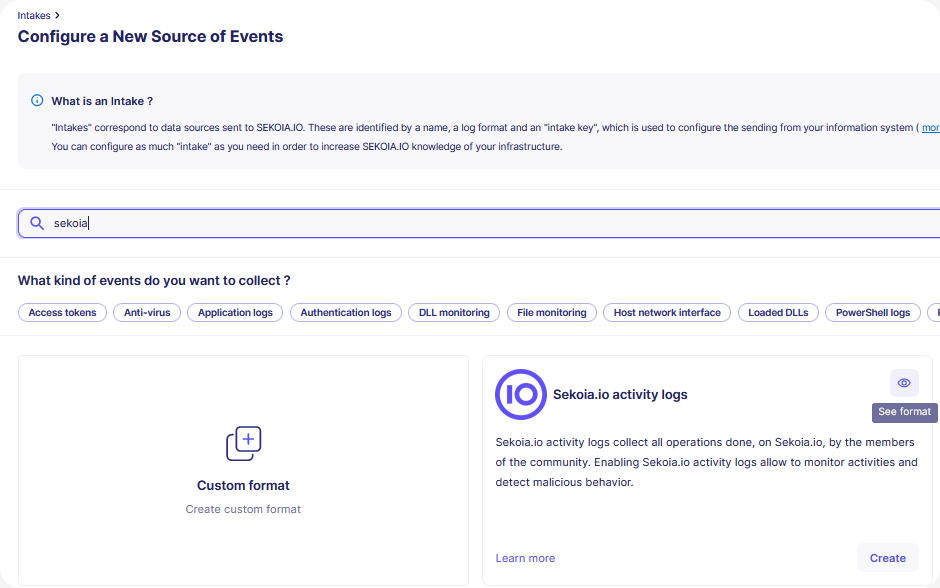
-
Paste log and check the field
sekoia.intake.parsing_error, please refer to this section to test your log
Fields to observe
| fields | meaning |
|---|---|
sekoiaio.intake.parsing_status |
result of the parsing (success / failure) |
sekoiaio.intake.parsing_error |
when the parsing is in failure, this field is available with information on the error that causes the failure |
sekoiaio.intake.parsing_warning |
some fields are not parsed correctly (detail will be displayed) |
Note
Please contact Support if you have any questions or feedbacks. We will be glad to assist you.
Event size limit and rejection behavior
Events exceeding 250 KiB are rejected by Sekoia's ingestion pipeline.
Events larger than 250 KiB are rejected
Sekoia drops any event that exceeds 250 KiB. These events are never ingested, parsed, or visible in the platform. Truncating oversized events is not possible, as it would produce malformed payloads (for example, broken JSON) that the parser cannot process.
How rejections are notified
The feedback you receive depends on the ingestion method:
| Ingestion method | Rejection behavior |
|---|---|
intake.sekoia.io (single event) |
Returns an HTTP 413 error |
intake.sekoia.io (batch) |
Returns a per-event ingestion status in the response body and an HTTP 413 error when all the events in the batch are rejected |
| Syslog | Events are dropped silently, no feedback is returned |
What to do when events are rejected
Identify oversized events
- For
intake.sekoia.io, monitor your HTTP responses. A413error confirms that a single event exceeded the 250 KiB limit. For batches, inspect the per-event status returned in the response to identify which events were rejected. - For syslog ingestion, there is no built-in rejection signal. Check the size of raw events at the source or at each component of your collection chain before they reach Sekoia.
Reduce event size at the source
- Review your log source configuration and filter out unnecessary fields before forwarding events.
- If your EDR or security tool generates very large events (for example, events containing full process memory dumps or large JSON payloads), configure it to reduce verbosity or split the data across multiple smaller events.
- For structured formats such as JSON, ensure the payload is valid and does not include redundant or base64-encoded binary blobs.
Test before deploying
Before connecting a new log source, send a sample of raw events to a test intake and verify that none exceed 250 KiB. This prevents silent data loss in production.