Alerts
Alerts are created by the Operations Center when an event matches a rule and a threat is detected. They serve as the central unit for security investigations, consolidating evidence and context.
Alert status and lifecycle
Sekoia.io allows you to customize alert statuses to adapt them to your SOC team's specific processes. Custom statuses enable you to define workflows that match your organization's requirements while maintaining consistency across alerts and cases.
Automatic migration
Legacy alert statuses (Pending, Acknowledged, Ongoing, Closed, Rejected) are automatically converted to custom statuses for existing users. Your current workflows remain unchanged.
Default alert statuses
By default, alerts use the following five statuses:
| Status | Description | Possible actions |
|---|---|---|
| Pending | Initial status when an alert is triggered. If the generation mode is Automatic, this changes to Ongoing. | Acknowledge, Reject, Validate |
| Acknowledged | Used when an analysis is ongoing. This status is optional if an analyst decides on a verdict quickly. | Validate, Reject |
| Ongoing | The alert is a true positive and countermeasures are not yet applied. This is the first status seen in automatic mode. | Close, Reject |
| Closed | Final status. All necessary actions have been applied. | No action accepted |
| Rejected | Final status. The alert was a false positive. | No action accepted |
| > | ||
| > ## Alert date |
When an alert is triggered, the alert date is set to the first trigger. Additional events that enrich the alert afterward do not update this date.
Alert urgency
Urgency is a number between 1 (very low risk) and 100 (very high risk) used to score the risk associated with an alert. It is calculated from the severity of a rule and the criticality of assets related to the alert.
Alert urgency = (Severity of the rule + Criticality of the asset) / 2
Note
When the criticality of an asset is 0 (N/A), the alert urgency is equal to the severity of the rule.
The interface displays urgency in both numerical and textual formats:
| Display | Value |
|---|---|
| Low | [0-50[ |
| Medium | [50-75[ |
| High | [75-100] |
Alert similarity
Alert similarity (Occurrence) is the process of collecting similar events into the same alert. This information is visible in the Alerts table in the Occurrence column.
Occurrence count
If an alert has 24 occurrences, it means 24 events were classified as similar and grouped into the same alert.
Similarity strategies
Alerts are considered similar if a list of fields defined by the similarity strategy have the same values for all events. Fields may be grouped so their values can be swapped.
Note
The effective similarity strategy for an alert is displayed in the alert Details tab.
There are three priority levels for defining the strategy:
- Similarity by rule - Defined during rule creation in the Rules Catalog.
- Similarity by event - Logic applied by Sekoia.io based on event data.
- Default similarity - Uses the same
entity,source.ip, anddestination.ip.
Similarity by rule
Rules available in the Rules Catalog may define specific similarity strategies during rule creation.
Similarity by event
Depending on the events that triggered an alert, Sekoia.io applies the following similarity logic. This logic follows Sekoia.io guidelines and cannot be edited directly.
| Condition | Similarity strategy |
|---|---|
dns.question.name exists |
[sekoiaio.entity.uuid, [source.ip, destination.ip], dns.question.name] |
event.dialect is Windows and user.name exists |
[sekoiaio.entity.uuid, user.name, user.id] |
event.dialect is Azure Windows and process.name exists |
[sekoiaio.entity.uuid, process.name, process.command_line] |
event.dialect is Azure Active Directory and user.name and action.name exist |
[sekoiaio.entity.uuid, user.name, user.id, action.name, action.type, action.outcome] |
event.dialect is Azure Active Directory and action.name exists |
[sekoiaio.entity.uuid, action.name, action.type, action.outcome] |
event.dialect is postfix |
[sekoiaio.entity.uuid, email.from.address] |
file.hash.sha256 matches the rule |
[sekoiaio.entity.uuid, file.hash.sha256] |
file.hash.sha1 matches the rule |
[sekoiaio.entity.uuid, file.hash.sha1] |
file.hash.md5 matches the rule |
[sekoiaio.entity.uuid, file.hash.md5] |
Note
If similarity by event does not meet your needs, contact your support team.
Default similarity
If no similarity is defined by the rule or the event, Sekoia.io uses the default formula: same entity, same source.ip, and destination.ip. The fields source.ip and destination.ip can be used interchangeably.
Note
When there is no data due to parsing issues, alert similarity is not shown. When both source.ip and destination.ip are empty, NULL may be used as a similarity basis.
Similarity and alert status
As long as a similar alert exists with a status in the Open or In Progress stage (e.g., Pending, Acknowledged, Ongoing), new matches are added as occurrences. If only Closed stage alerts are similar, a new alert is created, and previous alerts are listed in the Similar alerts tab.
Alert types and categories
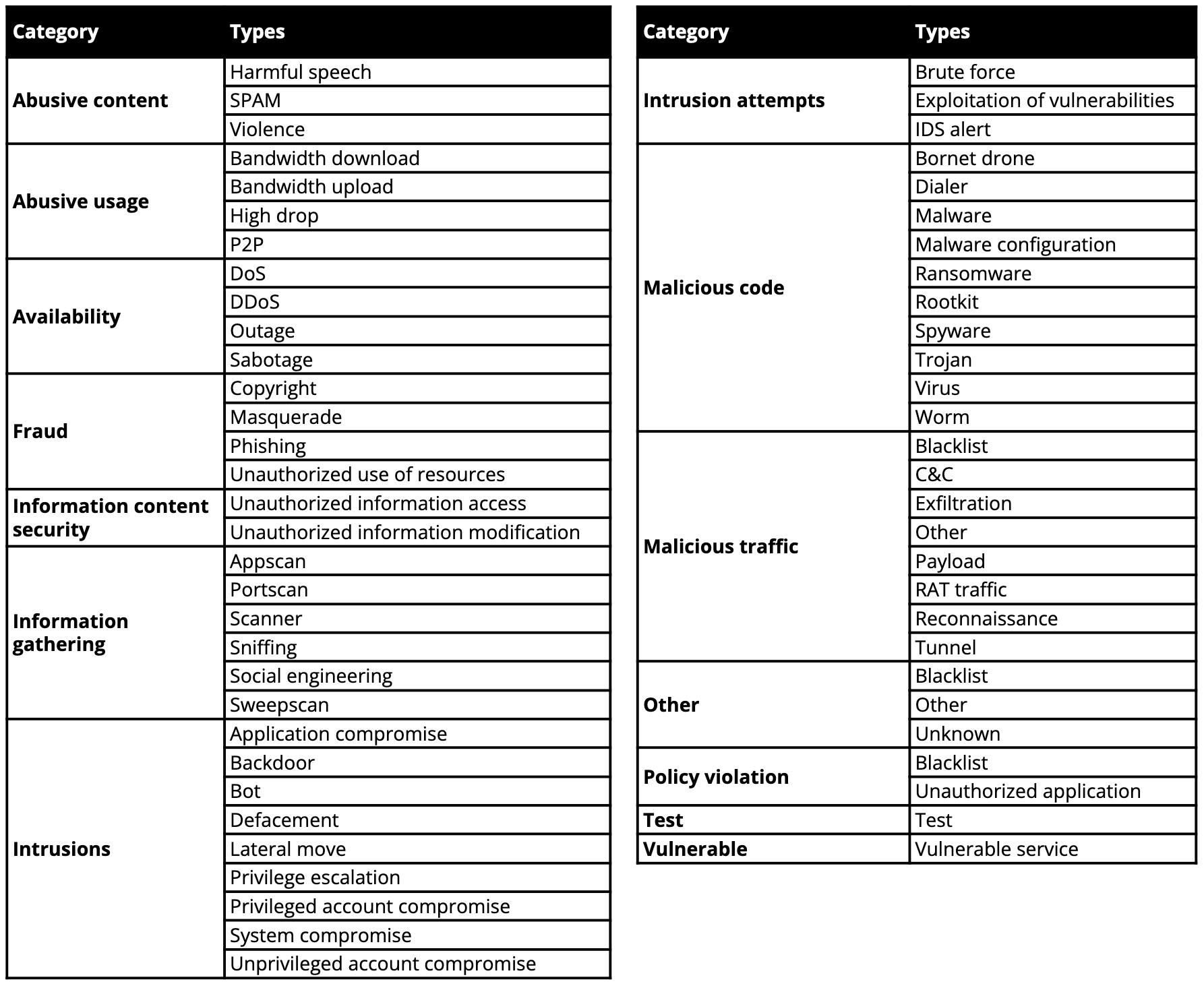
The alert type is associated with the triggering rule or specific indicators from CTI rules. Types are derived from the ENISA Reference Incident Classification Taxonomy.
Alert rate limiting
Alert rate limiting automatically contains misconfigured or runaway detection rules to protect your community from alert storms. If a rule generates 30 distinct alerts within 30 seconds, it enters a rate-limited state for 30 minutes.
For full details on thresholds, CTI rule behavior, and notifications, see Alert rate limiting.
Related articles
- Manage alerts: Learn how to filter and process alerts in the Operations Center.
- Filter and suppress alerts: Build complex queries and suppress false positives.
- Investigate an alert: Deep-dive into alert details, tasks, events, and similar alerts.
- Investigate alerts with Graph: Use visual correlation to analyze complex threats.
- Alert interface reference: Detailed lookup for alert table columns and icons.