Configure custom verdicts
Custom verdicts enable SOC teams to standardize classifications of alerts and cases beyond simple true or false positive determinations. This feature clarifies your team's stance on incident outcomes and improves communication with stakeholders.
Prerequisites
Access required
You must have administrative access to the configuration pages.
Verdict categories
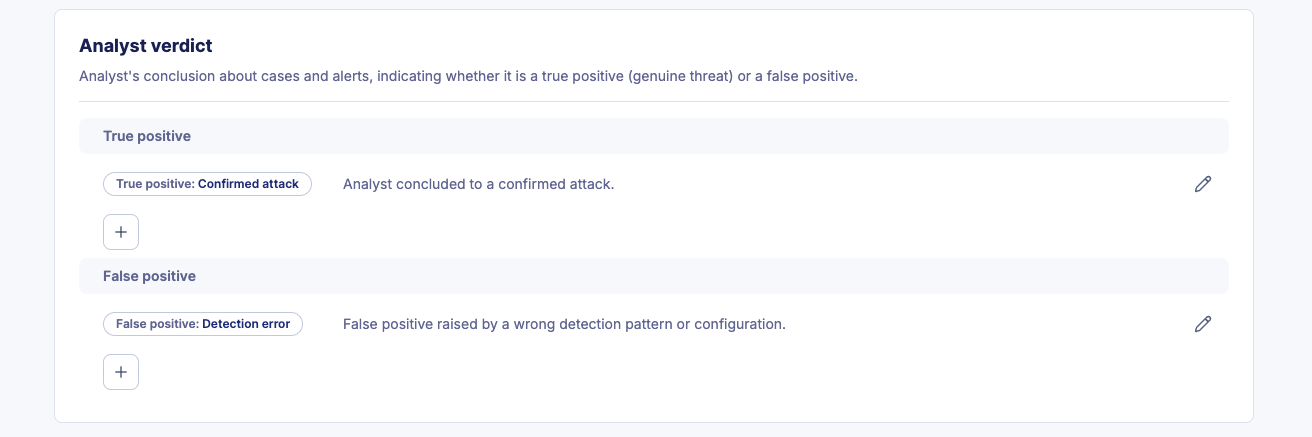
Each custom verdict belongs to one of two categories:
| Category | Description |
|---|---|
| True Positive | Confirms the alert represents a genuine security threat or incident. |
| False Positive | Indicates the alert was triggered incorrectly or does not represent a real threat. |
SOC teams often have different nuances for what constitutes a true or false positive. Custom verdicts let you capture these distinctions (e.g., "Confirmed Malware", "Policy Violation", "Benign Activity").
Create a custom verdict
- On the left panel, navigate to Settings > Configuration > Custom Statuses > Analyst verdict.
- Click + to create a new verdict in the appropriate category (True Positive or False Positive).
- Enter a Name (e.g., "Policy Violation").
- Enter a Description about when the verdict should be used.
- Click Save.
Edit a custom verdict
- On the left panel, navigate to Settings > Configuration > Custom Statuses > Analyst verdict.
- Click the verdict you want to modify.
- Update the Name or Description.
- Click Save.
Delete a custom verdict
Verdict in use cannot be deleted
A verdict cannot be deleted if it has been applied to any alert or case. You must remove or reassign the verdict on all affected items before deleting it.
- On the left panel, navigate to Settings > Configuration > Custom Statuses > Analyst verdict.
- Locate all alerts and cases using the verdict and reassign them to a different verdict.
- Return to the Analyst verdict configuration page.
- Click the delete icon next to the verdict.
Tip
Custom verdicts reduce miscommunication by establishing clear, documented definitions for alert and case outcomes. This is particularly valuable when multiple analysts work on the same alerts or when reporting to stakeholders.
Related articles
- Configure custom alert statuses: Define the workflow stages for your investigation.
- Manage alerts: Learn how to apply verdicts during an investigation.
- Alerts: Understand the underlying logic of alert stages and lifecycles.